How to use Thumbly Score
Thumbly Score rates a thumbnail 0 to 100 on virality, clarity, idea, curiosity, and emotion, then hands you three fixes. Here's how to run it on yours before you post.
4 min read ThumbnailsYouTubeGuidesThumbly ScoreThe teardowns on this blog already ran Thumbly Score on other people's thumbnails. This is the same tool, on yours, before you post.
It rates a thumbnail 0 to 100 on five things, writes a short verdict, and hands you three fixes. You can apply those in one click and score again.
What the five numbers mean
These are not vibes. Each one is a 0 to 100 score on a specific job.
**Virality** is whether the image can get clicked in a crowded feed. Big subject, hard contrast, something that stops the scroll.
**Clarity** is whether you can read the idea at a glance. If someone has to squint to know what the video is, this number drops.
**Idea** is whether the concept is doing real work, or whether it's a pretty photo of a thing. A face next to a giant penny is an idea. A guy at a desk is a photo.
**Curiosity** is whether you need to know more. Pretty is not the same as "I have to click."
**Emotion** is whether a face or a feeling actually hits. A polite smile usually loses to a real one.
If you want the longer version of why faces and one object work, that's [the psychology of a clickable thumbnail](/blog/youtube-thumbnail-psychology). This post is the tool.
How to run a score
Sign in at [getthumbly.com](https://www.getthumbly.com/app). Score lives on a thumbnail card, not on a separate page. The marketing page at [/thumbly-score](/thumbly-score) just sends you into the app.
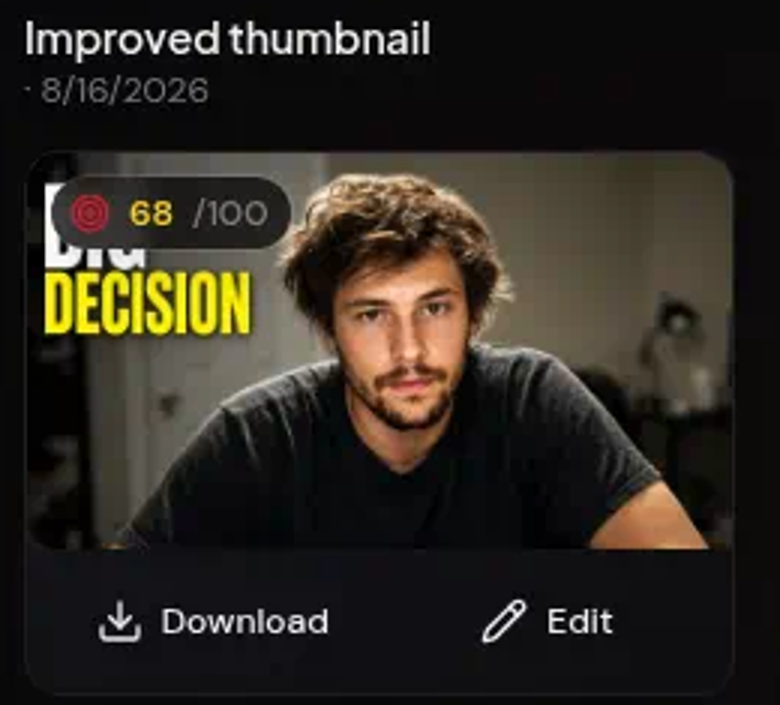
The badge sits on the card. Click it and the five numbers open.
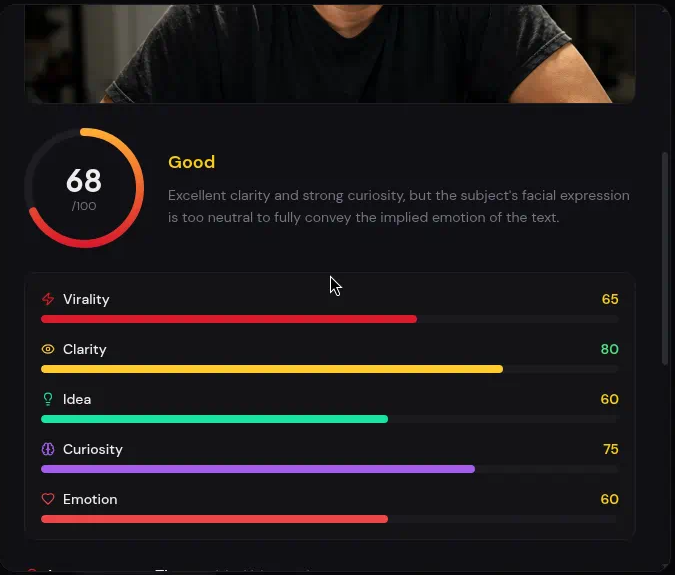
Scoring is free. It does not spend generate credits. Applying the tips does.
You can also score an image you already have. Get it onto a card, then hit Score. The badge is what runs the analysis.
A real run
We took a cluttered desk photo, the kind of "this is my setup" thumbnail that looks fine in a camera roll and dies in a feed, and ran it through Score.

**Thumbly Score: 15/100**
| Dimension | Score |
|---|---|
| Virality | 15 |
| Clarity | 20 |
| Idea | 10 |
| Curiosity | 15 |
| Emotion | 15 |
The verdict: *"A raw, unoptimized snapshot; its biggest weakness is the flat lighting and lack of an engaging expression."* That is polite. You cannot tell what the video is. The face is looking down. The room is doing more work than the subject.
Score wanted three things. Relight the face and give it a real expression. Crop in so he fills the frame, and blur the junk behind him. Add two or three words that name the stake.
We applied those in one click.

**68/100, up 53.** Clarity went from 20 to 80. Curiosity went from 15 to 75. Virality jumped 50 points. The crop, the light, and the "BIG DECISION" line did that. You can read it at feed size now.
Emotion only went to 60. The face is still pretty flat for a title that big. Score said so. That is the next pass, not a redesign. At 15 you needed a thumbnail. At 68 you need a better face.
When to stop
A high 80 or a 90 is not a dare. Take the one tip that adds separation or a clearer stake. Leave the joke alone.
If Score says the image is pretty and curiosity is the soft number, the fix is a clearer stake, not more arrows. That showed up on the [airline Trahan thumb](/blog/ryan-trahan-thumbnail-teardown) and it will show up on yours.
If the idea is missing, no grade will save it. Fix the concept, then run Score again. A 15 with idea at 10 is that case. The one-click fix got us to 68 because it finally named a decision. It did not invent a better video.
Score it before you post
Run the thumbnail you were about to upload. If the five numbers and the three tips agree with your gut, post it. If they don't, take the one change that would actually move a number.
[Open Thumbly Score](/thumbly-score) and try it on the next one.
